
|
|
XphoneSpeeddialAndBusyPanelKeySettingsThere are 30 LEDs and 30 memory keys on the XPhone. By using the Shift key, 120 extension and trunk line access codes can be written to 30 keys, or the number sequence that you want to dial quickly can be written by using it as a memory key. When the access code of the extension or trunk lines is typed into the memory key, the bust status of these ports can also be monitored. When the shift key is pressed, the shift key flashes quickly and the busy of the second 30 ports can be monitored. Likewise, when the shift key is flashing slowly or constantly on, the busy of the third and fourth 30 ports can be monitored. The status of the LEDs is explained below.
To record to the memory key button, you can use the web interface of the exchange or use the arrow keys of the Xphone to select the Set Memory Key button setting from the menus that appear on the screen and record. After selecting Memory Key Setting from the menus, press OK. After pressing the relevant memory button, press OK and write the numbers (or access code). To enter records for the second, third or fourth 30 keys other than the first 30, press OK after selecting the Memory key setting. After setting the slow, fast or continuous burning position of the Shift key, press the relevant memory key and press the OK key and then write the numbers (or access code). To access the busy panel and memory keys via the web interface, you must connect to the exchange using http://the exchange's IP address or url name/user.asp. When the connection is established, a username and password window opens in the web interface. When the subscriber whose password is different from 0000 enters his phone number in the username field and his 4-digit password in the password field, the User properties page is accessed. You can enter the relevant pages by clicking on the desired Speed dial button definitions at the bottom of the page. How to change the password to make the user password different from 0000 please look the following link Password Update To edit a label and write a name on the busy panel, right-click on the top band of the Xphone and select Edit tags. After the selection is made, a new window opens for typing the name by pressing the desired speed dial key. 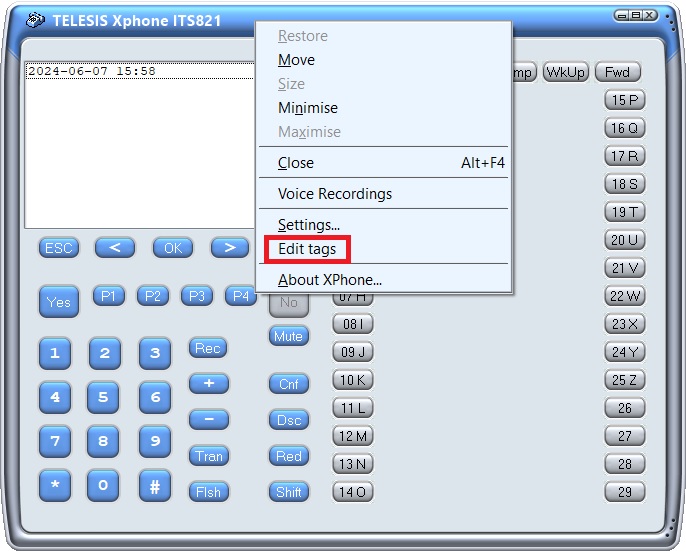 Click next to the button to edit a label  In the Tag update window; Default means first 30 memory keys, Shift fast flash means second 30 memory keys, and the others, with the same logic, the third 30 and the 4th 30 |