
|
|
ActivateAutoVoiceRecordingOn the common properties page of the port for which automatic voice recording is desired. Mark Voice recorded for all calls check box. 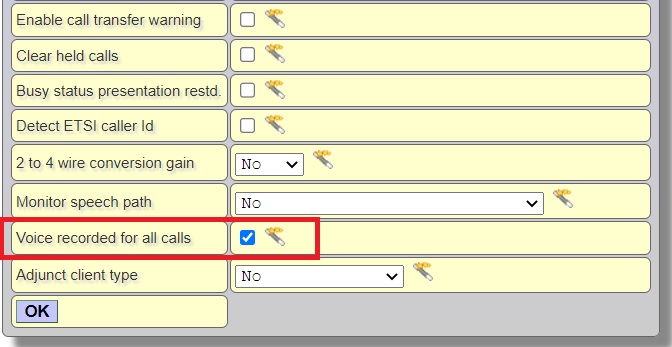 It is possible to mark any number of users for auto voice recording provided that the sum of speech channels of marked users is less than or equal to the installed Auto voice recording channel licences Speech channels of Bri ISDN users are 2, CCS E1 users are 30 and defined Call capacity for Voip (SIP and H323) users. If this checkbox is marked for SIP or H323 users, they will always use media proxy. Uploading voice records via FTP Telesis system acts as a client and periodically tries to connect to an FTP server to transfer automatic voice (conversation) recordings in compressed or uncompressed format. In case of compression (for Telesis systems licensed with VoIP codecs), the codec to be used for decompression is VivoActive G.723.1. Otherwise, i.e., uncompressed transmission, the A-Law codec is used. Note that uncompressed one-minute record occupies 480 KB disk space while a compressed one occupies 60 KB disk space. The archiving device can be any FTP server on any operating system. Each conversation record, which is uploaded to the archiving FTP server, has a clear file name. The file name indicates:
Consequently, software enthusiasts (from novice to professional) may easily develop their own applications, which may index, filter, report uploaded conversation records. Open Voice recorder settings page from Ethernet / VoiceRecorder and set Ftp server IP address and Ftp server port according to your ftp server definitions. Default ftp port is 21. If the ftp server needs login id and password, Login ID and Password fields should also be filled. Server should grant full access authorizations to the account (read, write and delete). Directory is the path to the subdirectory to write files, relative to home directory. 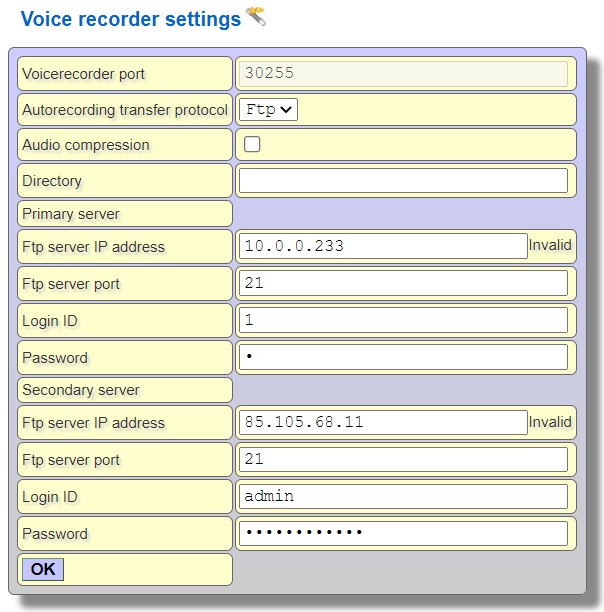 Auto recorder interface acts as a client and periodically tries to connect to the Primary server to send recordings. If connection fails, Secondary server will be tried. If auto voice recordings are to be selected with Xtools on the FTP server where the auto voice recordings are sent, the auto voice recordings should be transferred to the Wav folder located under the Xtools folder. Internal Links |