
|
|
XymphonyProgramming-CreatingLicenseRequestFileWhen to Install Licenses
Installing Licenses at the Factory The license data is stored in non-volatile memories of the Telesis system. In your purchase order, you should clearly indicate which options (or licenses) to be installed into which Telesis system. Your purchase order should contain ordering codes of both hardware and requested licenses, or ordering codes of Stillink systems. Viewing Installed Licenses To view installed licenses, access to Creating License Request File with the Telesis System To create a license request file within the Telesis system, click on Then,
General feature utilization license unlocks all features. 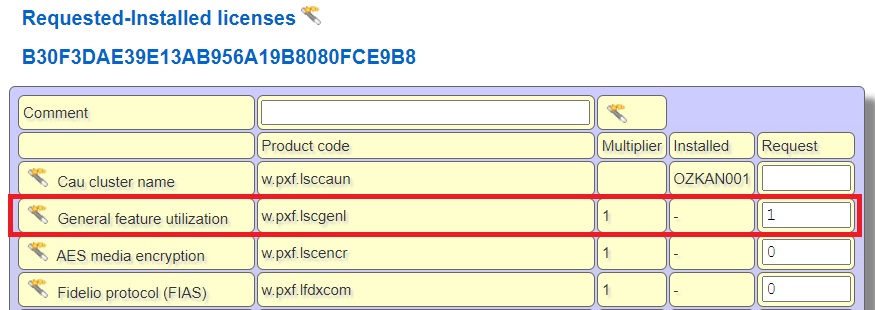 While creating your license request file within the Telesis system, help links in each row will assit you. Write 1 in Request of General feature utilization license. The result is a license request file, which is created within this Telesis system. Next step is downloading this request file and sending it to Telesis A.S. Downloading License Request File (in order to send it to Telesis A.S.) To download the created license request file from the relevant Telesis system, click on Save the XID file in your computer and send it to Telesis A.S. to order the requested licenses. Telesis A.S. returns the liecense file with the extension XOP, which has to be uploaded onto this particular Telesis system. Be aware that the XID file and the Telesis-generated XOP file are unique files for a particular Telesis system. So, the XOP file can only be used for the Telesis system from which the XID file has been created. Uploading Telesis-generated License File To upload Telesis-generated license file onto the Telesis system, click on When the upload is completed, open Important Note: 1.XID and XOP files are your property. Please keep them safe as a pair and also note the ID of the system somewhere safe. To remind you, this information may be necessary for after-sales or maintenance services. 2.Keep your request and license files in a safe place. If you try to install an invalid license file to your system, you may need to reinstall your original license file. Internal Links |