
|
|
XymphonyProgramming-SIP-TLS-SRTPEnable SRTP (Secure rtp) To enable SRTP mark Srtp check box in common properties page of sip port 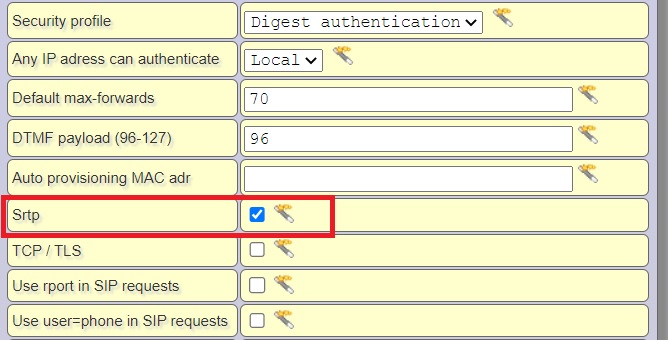 SIP Signalling Protocols Xymphony supports UDP/TCP and TLS Sip signaling protocols Sip uses UDP protocol in factory settings. To use TCP protocols, mark TCP/TLS check box in common properties of sip port. If the checkbox is marked Sip signalling will be TCP not UDP.  To use TLS protocols, mark TCP/TLS check box in common properties of sip port and mark TLS check box in SIP voip settings page (Ethernet/Sip). If the TLS box is checkmarked, all TCP signalling sip users will have TLS(transport layer security) feature enabled. Restart the Xymphony so that the change is valid.  Subject, expiry date and serial number of the certificate to be used for TLS(Transport layer security). System has an embedded certificate that is self signed by Telesis A.S. Some browsers may issue a warning for self signed certificates. Activation of TLS for system web server to support https protocol can be found Ethernet/WebServer  Activation of TLS for TCP signalling sip users can be found Ethernet/Sip Users can upload and remove their certificate and key pairs using RSA Key upload and RSA certificate upload links and buttons below. 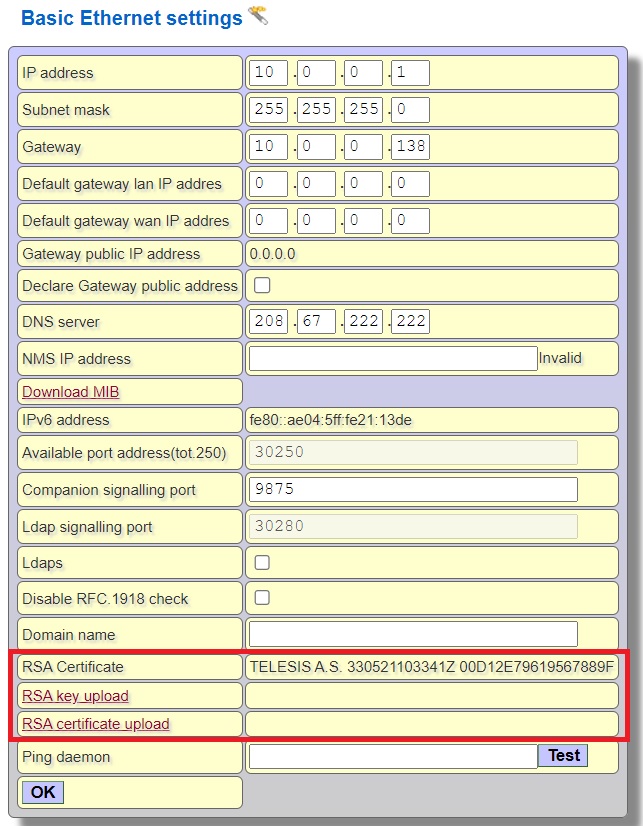 Internal Links |