
|
|
Xymphony-PMISettingsA license is required for the Fidelio application. The Fidelio protocol (FIAS) license must be installed on the PBX via the License/Edit page accessed from the main page. 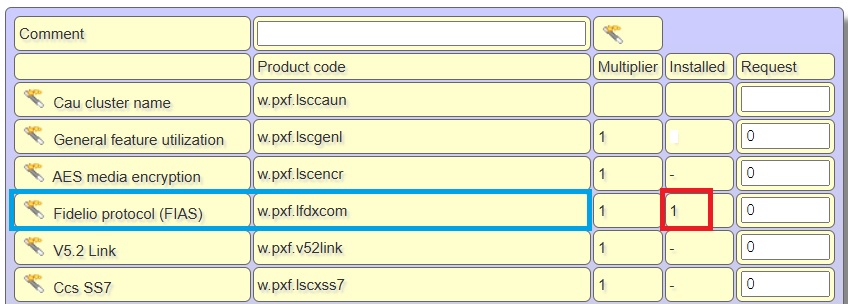 After installing the license, set Ethernet/Cmdr/Cmdr protocol to Fidelio, then press OK.  Set Ethernet/Cmdr/Fidelio server IP address and Ethernet/Cmdr/Fidelio server port according to your Fidelio server requirements, press OK,  For subscribers using the hotel room, on the Account settings page, under System authorized calls, check box number 14.  For the room phone to be able to make external calls after check-in with Fidelio, authorization level 14 is required. Therefore, the authorization level for the prefix to be used for external calls in the routing criteria table for the phones used in the rooms must be selected as 14. 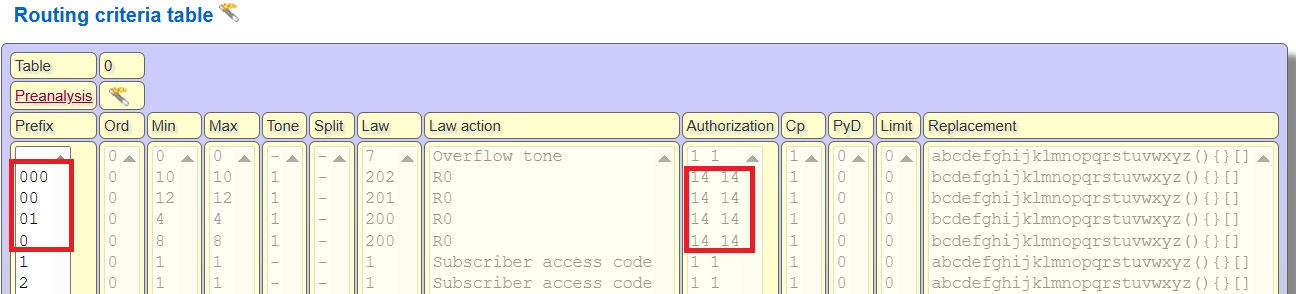 Save system parameter via SystemPrm/Save link,  And restart your system via Control Program/Reboot  Internal links |