
|
|
XymphonyProgramming-FirmwareUpgradeUpgrading the Xymphony in the field is accomplished simply by uploading a new version of it directly into the Telesis systems` disk over IP, without interruption of any of the system`s services. Telesis A.S. may make updates, improvements and/or changes in the Xymphony of its systems at any time without any notice. Telesis System`s Disk Storing Xymphony Telesis system`s nonvolatile disk has the capability of storing two images of Xymphony releases at the same time. One image is the default Xymphony, which runs the system in booting. Another may be for back-up purposes (like a previous version of Xymphony). Marking Default Xymphony If there are two images of Xymphony in a Telesis system, one of them should be set as the default one. To mark a Xymphony as the default one, click on
Select one of the Xymphony files and then click on Removing a Firmware If there are two images of Xymphony in a Telesis system, the one, which is not marked as default, may be removed to allow space for uploading another new Xymphony into the Telesis system. To remove Xymphony, click on
Select the Xymphony, which is not marked as default, and then click on In order to remove the default Xymphony, first mark the other Xymphony as Default (as mentioned in the previous section) and then remove this desired Xymphony. Xymphony Upgrade in Normal Operational Mode If there is only one image of Xymphony in a Telesis system, it is possible to upload another new Xymphony into the Telesis system. To upload a new Xymphony, click on
Browse the Xymphony image file and then click on The system will start up with this new uploaded Xymphony. Xymphony Upgrade in Service Mode If Xymphony upgrade has to be done within a LAN and if uploading the new firmware becomes difficult in normal operation mode, then starting the Telesis system in service mode may become necessary. Links in Service Mode Page are:
If the Telesis system`s disk has one Xymphony image file, then the following service page opens. This page has the link 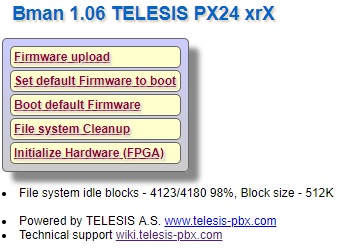 If the Telesis system`s disk has two Xymphony image files, then the following service page opens. This page has the link 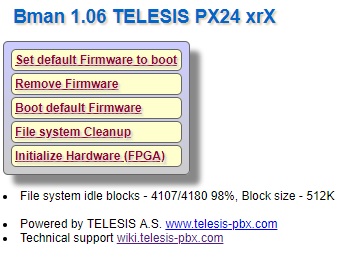 Click on Notes All software, that you may download from the Telesis Download Center, may operate with the relevant Telesis systems only. Telesis A.S. may make updates, improvements and/or changes in the Xymphony operating software (firmware) of its systems and/or hardware at any time without notice. Consequently, downloaded software may be incompatible with some Telesis hardware. Telesis A.S. recommends you to read Update History before making any firmware upgrade. Telesis A.S. recommends you to avoid unnecessary firmware upgrades. Internal Links |